Understanding Vector Databases: How They Work and Search
June 9, 2026
Introduction
After my company decided to add RAG, I naturally started working with Vector DB.
As a developer, I prefer to understand a technology in detail before applying it, so I started studying Vector DB and decided to organize what I learned in this post.
What Is a Vector?
A vector is a way to represent data as an array of numbers.
When text, images, audio, and other data are embedded, they are converted into high-dimensional vectors.
Example) coffee => [0.12, -0.45, 0.47, ...]
Each number in this array represents one dimension.
In other words, a vector is like a coordinate used to place data in a high-dimensional space.
Data with similar meaning tends to be placed close together in the vector space.
Reference) https://developers.openai.com/api/docs/guides/embeddings
Basic Flow of a Vector Database
- Convert the required data into vectors using an embedding model.
- Store the vectors and metadata in a vector database such as Qdrant.
- Convert the user's search query into a vector in the same way.
- Compare it with the stored vectors and return the closest results.
To understand this flow, we first need to understand embedding.
Embedding is the process of converting data such as text, images, or audio into vectors, which are numeric arrays that contain meaning.
The vector created through this process is called an embedding vector, and the model that performs this conversion is called an embedding model.
Let's look at embedding in a little more detail.
How Does an Embedding Model Create Vectors?
An embedding model does not convert a sentence directly into a vector in one step.
Internally, it goes through several steps to create a numeric array.
-
Split the sentence into tokens.
- This process is called tokenization, and the tool that performs it is called a tokenizer.
- A token can be a word, or it can be a smaller piece of a word.
-
Convert each token into a numeric ID.
- The tokenizer looks up each token in its tokenizer vocabulary and converts it into a corresponding numeric ID.
- For example, the sentence "I went to the bank" could be converted into an array of token IDs such as
[3512, 48, 9021].
-
Convert the numeric IDs into vectors.
- Each token ID is converted into a numeric array through an embedding table.
- For example, the ID
3512could be converted into a vector like[0.12, -0.31, 0.78, ...].
-
Create the final vector with context.
- The same word "bank" can mean a financial institution or the side of a river depending on context.
- The embedding model calculates relationships between tokens in the sentence and creates a vector that reflects the context.
As a result, the embedding model converts a sentence or document into a numeric array that contains meaning.
Structures such as Transformer Attention may be used in this process, but this post only covers the level needed to understand how Vector Database search works.
What Is Stored in a Vector Database?
A vector database usually stores the following information.
-
id
- A unique value used to identify each data item.
-
vector
- A numeric array created by passing the original text into an embedding model.
- These vectors are compared to find semantically similar data.
-
metadata
- Additional information about the vector.
- Examples include
document_id,title,source, andchunk_index.
-
payload
- The original text or data to show again in the search result.
- In some cases, the database stores only a reference to where the original data exists instead of storing the original text directly.
Long Documents
Long documents are usually split into multiple pieces before being stored.
Each piece is called a chunk.
For example, a refund policy guide can be split like this.
chunk 0: Refund eligibility
chunk 1: Non-refundable cases
chunk 2: How to request a refund
Each chunk is stored as one vector, and information such as document_id and chunk_index is stored together in metadata.
Vector databases also create internal search indexes to find similar vectors quickly.
A representative example is HNSW.
Similarity
Earlier, I mentioned that the database compares the query vector with stored vectors and returns the closest results.
The phrase "closest results" is important here.
Traditional RDBs are good at retrieving data that exactly matches clear conditions such as id, status, or created_at.
However, in RAG, we need to find documents or sentences that are semantically similar to the user's question.
For example, "I can't log in" and "I forgot my password" are different expressions, but they can both be related to an authentication problem.
In this case, simply checking whether the same words are included has limitations.
So a Vector Database converts sentences or images into vectors and compares how similar they are by calculating distances between vectors.
In other words, Vector Database search is not about finding exactly the same value. It is about finding the closest data in vector space.
Similarity Calculation Methods
There are three common similarity or distance calculation methods.
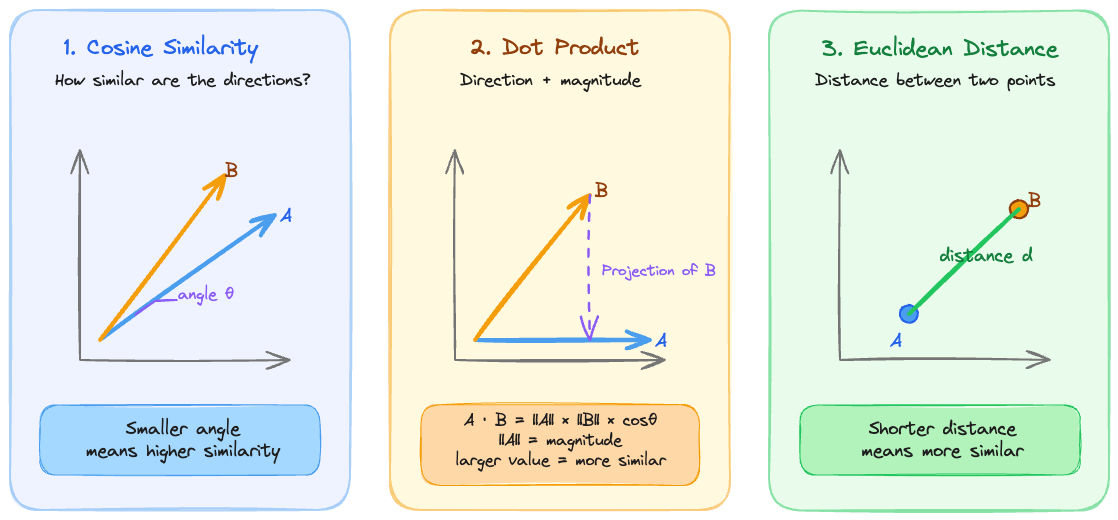
Cosine Similarity
- Measures how similar the directions of two vectors are.
- Commonly used in text embedding search.
Dot Product
- Calculates similarity by multiplying two vectors.
- The Dot Product becomes larger when two vectors point in similar directions and have larger magnitudes.
- Some embedding models recommend using Dot Product.
Euclidean Distance
- Calculates the straight-line distance between two vectors.
- The smaller the distance, the more similar the vectors are.
- It is also commonly called L2 Distance.
Index
As mentioned earlier, a Vector Database compares the user's query vector with stored vectors to find the closest results.
However, if there are hundreds of thousands or millions of vectors, comparing every vector one by one is too slow.
That is why Vector Databases use indexes to quickly find nearby vectors.
What Is ANN?
ANN stands for Approximate Nearest Neighbor. It is a search method that does not compare every vector one by one, but quickly finds candidates that are likely to be close.
Instead of always guaranteeing the exact nearest vector, ANN focuses on finding results that are close enough much faster.
What Is HNSW?
HNSW stands for Hierarchical Navigable Small World.
It is a representative graph-based index algorithm used to implement ANN search.
Vectors are connected like nodes in a graph.
During search, HNSW narrows down candidates by following nodes that are closer to the query vector.
The actual traversal is close to Priority Queue + Best-First Search. It is not Breadth-First Search.
In a typical BFS, nodes are explored based on how many connection steps away they are from the starting point.
In Best-First Search, candidates closer to the query vector are explored first.
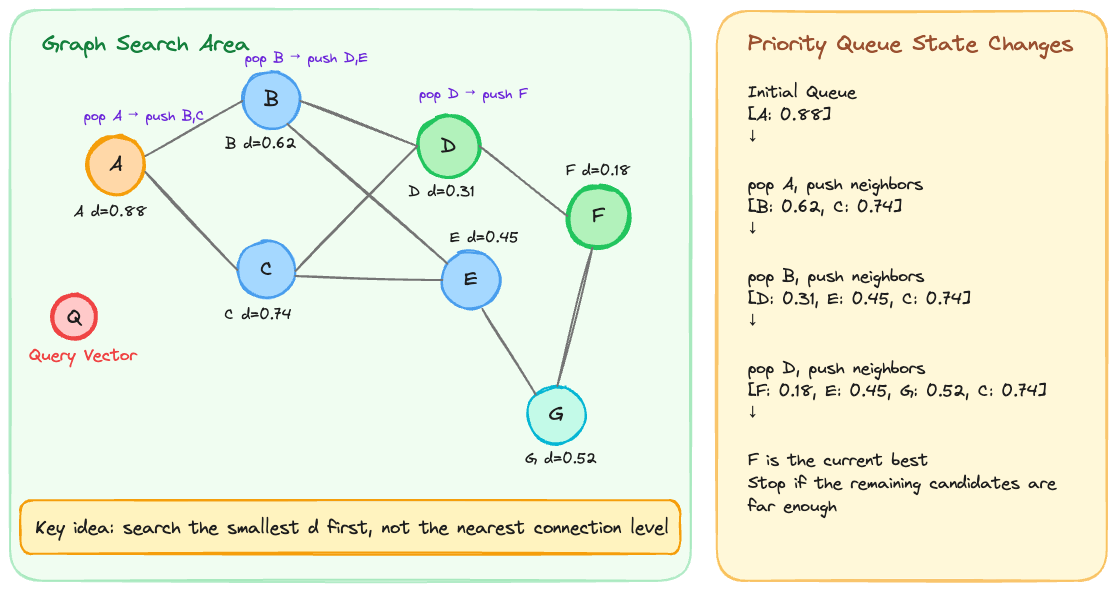
Here, d means distance. The lower the value, the closer it is to the query vector.
It can also be expressed as a score. In that case, a higher score usually means higher similarity.
At this point, a natural question can come up.
If there are 1 million data points, does HNSW have to search all 1 million?
No. HNSW does not compare every vector one by one.
It reduces the search range mainly in two ways.
-
It searches closer candidates first.
HNSW follows candidates that are closer to the query in the graph.
If a path is unlikely to produce a closer candidate than the current one, it does not need to deeply explore that path.
Because of this, it does not have to check every vector. -
It controls the search width with
ef_search.
ef_searchmeans the number of candidates maintained during search.
A larger value checks more candidates, which can improve accuracy but may slow down search.
A smaller value can make search faster, but it increases the chance of missing closer candidates.
How Are Search Results Returned?
So far, we have looked at how an embedding model converts data into vectors and how a database searches using similarity calculation and indexes.
This naturally leads to a few questions.
How many candidates should be returned?
What if the returned candidates are not actually relevant?
Can we adjust the order of the returned candidates again?
Let's answer these questions below.
Top-K
A Vector Database usually returns the closest K results.
For example, if K = 5, it returns the five vectors closest to the query.
Threshold
Even if the data returned by Top-K is not actually relevant, it can still be returned as the closest result among the stored data.
This means that in RAG, irrelevant documents may be passed to the LLM.
To reduce this problem, we use a threshold.
A threshold is the minimum criterion for using a search result.
For example, assume that we set threshold = 0.3 based on distance.
Distance means that the lower the value, the closer it is to the query.
If the closest document in the Top-K results has distance = 0.31, it is larger than the threshold 0.3, so we can treat it as not relevant enough.
In this case, we can avoid passing the document to the LLM or handle it as "no relevant document found."
Rerank
The results returned by Top-K are not always guaranteed to be in the best final order.
Vector Search is good at quickly finding close candidates, but it may not perfectly reflect the user's intent or the detailed context of each document.
The process of evaluating the retrieved candidates again and adjusting their order is called rerank.
For example, a Vector Database can first retrieve 20 candidates with Top-K.
Then a reranker model can score how relevant each document is to the question.
Finally, only the top 3 to 5 most relevant documents can be passed to the LLM.
Storage Space
Vector DB can use more storage space than ordinary text data.
This is because it stores not only the original text, but also the high-dimensional vectors created by the embedding model.
Vector storage size can be roughly calculated with the following formula.
vector size = dimension x bytes per value
total size = vector count x dimension x bytes per value
Here, dimension means the number of numeric values that make up a vector.
To keep the calculation simple, let's use float32 as the baseline.
float32 uses 4 bytes per value.
Using OpenAI's commonly used text-embedding-3-small model as an example, the default vector dimension is 1536.
So one vector is calculated as follows.
// per vector
1536 x 4 byte = 6144 byte = 6KB

// 1 million vectors
6KB x 1,000,000 = 6GB
This only covers the size of the vector data itself.
In reality, metadata, payload, and indexes also exist, so the actual storage usage can be larger.
Memory
A Vector DB can store data on disk and read it when needed, or load data into memory to improve search speed.
In particular, graph-based indexes such as HNSW need to quickly traverse many nodes and neighbor links during search, so search performance improves when the index is in memory.
Memory is not only used to store vectors.
Additional memory is also needed during the search process.
For example, if we have 1 million vectors + 1536 dimensions + float32 (4 bytes) + HNSW + small metadata, the required memory can be estimated as follows.
Raw vectors: 6GB
HNSW index: 1~3GB
metadata / payload / DB overhead: 1~3GB

Minimum: 8~12GB
Recommended headroom: 16GB
The important point is that this is based on 1 million vectors, not 1 million documents.
If documents are long and split into chunks, the number of vectors can become much larger.
Summary
Vector DB converts data into vectors through an embedding model and searches by finding nearby data in vector space.
If traditional RDBs are strong at exact-match condition queries, Vector DBs are strong at finding semantically similar data.
Comparing all vectors at scale is expensive, so Vector DBs use ANN to quickly narrow down candidates that are likely to be close.
HNSW is a representative graph-based index that implements this approach.
Search results are also not used as-is.
Top-K, threshold, and rerank can be used together to adjust the final results.
In production, storage and memory usage should also be considered based on dimension, storage type, index, and metadata.
Share this post
Comments (0)
No comments yet. Be the first to comment!