RAG Experience: Building Long-Term Memory for Characters
June 5, 2026
Introduction
In the existing character chatbot service, we had to pass many previous conversation turns to the LLM so that the character could maintain context. As a result, once the conversation exceeded a certain number of turns, older messages could no longer be remembered. Token usage also increased, which became a cost concern from a business perspective.
To solve this problem, we decided to introduce RAG.
What Is RAG?
RAG stands for Retrieval-Augmented Generation.
In simple terms, it is a method where the LLM does not generate an answer immediately, but first retrieves relevant documents or memories and then uses that information to generate a response.
In a character chatbot service, RAG allows the character to retrieve previous conversations and respond as if it remembers the past. To build this long-term memory structure, we applied Qdrant as the Vector DB.
Scope of This Post
As a backend developer, I was responsible for backend integration, architecture design, and system implementation, rather than RAG research or the search strategy itself.
I connected the chat server, Python server, Vector DB, and LLM call flow so that the long-term memory feature could work within the actual service flow.
Therefore, this post focuses less on the detailed RAG search strategy and more on how the character long-term memory feature was connected and implemented in the backend system.
Design
Architecture
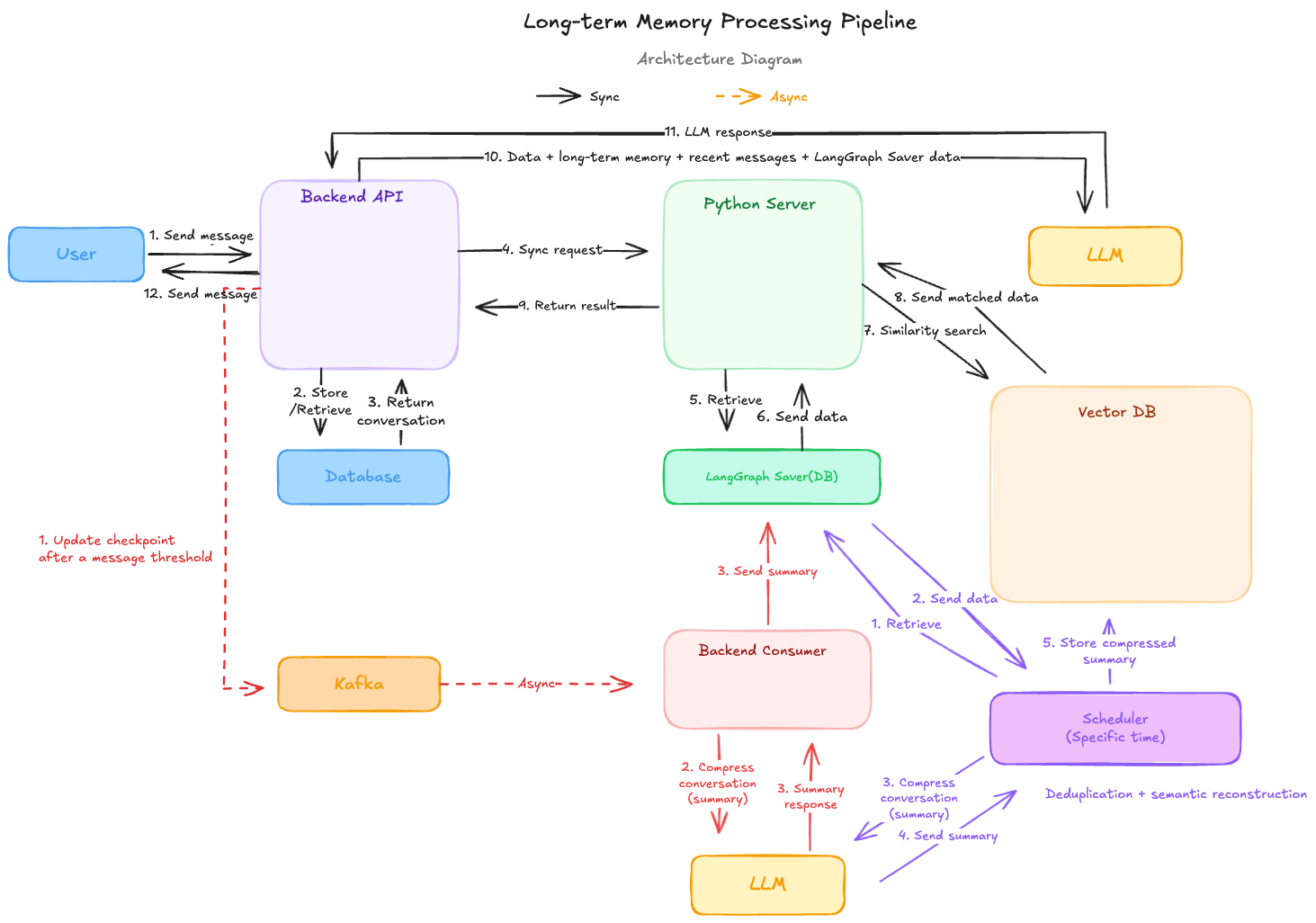
The architecture is shown below.
Separating Recent Memory and Long-Term Memory
When implementing long-term memory, not every conversation was handled in the same way.
Recent conversations are important for maintaining the current context, while older conversations are closer to memories that should be retrieved only when needed. Therefore, recent conversations were kept separately, and older conversations were summarized and retrieved so that only the necessary information would be passed to the LLM.
By separating them this way, we could use both the current context and past memories without passing every conversation to the LLM.
Search Flow
The search flow is as follows.
- The user sends a chat message.
- The backend performs the necessary preprocessing and retrieves recent conversations.
- The backend sends the chat data to the Python server.
- The Python server embeds the chat data.
- The Vector DB is queried using the generated embedding.
- The retrieved summary and recent summary are returned to the backend.
- The backend sends the recent messages, recent summary, and retrieved summary to the LLM.
- The LLM response is post-processed and sent back to the user.
In summary, when the amount of conversation increases, recent conversations are summarized first. After a certain point, those summaries are summarized again into long-term memory summaries.
In other words, instead of passing every conversation to the LLM every time, the system keeps the recent context short and retrieves only the necessary parts of older conversations from the Vector DB.
Summary Storage Flow
The summary storage flow is as follows.
- When a certain number of messages has accumulated, the backend publishes a summary job event containing
startIndexandendIndexto a Kafka topic. - The Consumer reads the message from the Kafka topic and retrieves the messages in the
startIndex~endIndexrange from the database. - The retrieved messages are sent to the LLM to generate a recent conversation summary.
- The generated summary is sent to the Python server, and the Python server stores it in the LangGraph checkpoint storage.
The reason for processing this asynchronously is as follows.
- The summary job is separated from the chat response flow, which helps reduce response time.
- Failed summary jobs can be retried more easily at the message level.
Daily Summary Storage Flow
The daily summary storage flow is as follows.
- At a specific time, a batch job runs.
- The batch job sends a request to the Python server with recent messages that have not yet been summarized.
- The Python server uses both the unsummarized recent messages and the summaries stored in LangGraph checkpoint storage to request a daily summary from the LLM.
- The generated daily summary is embedded.
- The summary text, embedding value, and metadata are stored in the Vector DB.
Retrospective
At first, I felt some pressure because I had no prior experience with long-term memory. However, by studying how Vector DB works and applying it to a real service, I was able to learn a lot.
As a result, by using RAG, we reduced the token usage passed to the LLM by about 44%, and we were able to use a much wider range of previous conversations as memory.
However, RAG is not a structure that is finished simply by attaching a Vector DB. The result can vary greatly depending on what data is stored, when it is summarized, and how the retrieved information is passed to the LLM.
Through this experience, I realized that what matters in RAG is not only the search technology itself, but also the process of designing what data should remain as memory and in what context it should be retrieved again.
Going forward, I want to continue improving summary quality, context composition, and search result evaluation criteria to make the search quality more stable.
Share this post
Comments (0)
No comments yet. Be the first to comment!