Solving CORS Errors in CloudFront + S3 with Signed Cookies
January 13, 2026
What is CloudFront?
CloudFront is a CDN service provided by AWS. By using caching, it allows users worldwide to download files quickly. In other words, it helps overcome latency issues caused by physical distance.
Mechanism
First, CloudFront operates by wrapping S3. The flow proceeds in the order of Request ⇒ CloudFront ⇒ S3 ⇒ CloudFront ⇒ Response.
If you use the Signed Cookie method, it operates as follows:
Troubleshooting
While setting up CloudFront, I encountered various issues that resulted in CORS errors in the browser, causing me to struggle quite a bit. I want to share that experience here.
First, CloudFront was set up as https://dev.cloudfront.junlog.dev, and the page using it is https://dev.junlog.dev.
The backend was https://dev.junlog.dev, and the internal code was as follows:
// CloudFrontService
@Injectable()
export class CloudFrontService {
  private readonly domain = process.env.CLOUDFRONT_DOMAIN;
  private readonly keyPairId = process.env.CLOUDFRONT_KEY_PAIR_ID;
  private readonly privateKey = process.env.CLOUDFRONT_PRIVATE_KEY;

  async generateSignedCookies(basePath: string, expiresInMs: number = 100000) {
    // Use S3 + CloudFront Signed Cookies (All environments)
    const url = `${this.domain}/${basePath}/*`;
    const expiry = Math.floor((Date.now() + expiresInMs) / 1000);

    const policy = JSON.stringify({
      Statement: [
        {
          Resource: url,
          Condition: {
            DateLessThan: { 'AWS:EpochTime': expiry },
          },
        },
      ],
    });

    return getSignedCookies({
      policy,
      keyPairId: this.keyPairId!,
      privateKey: this.privateKey!,
    });
  }
}

// Service
const expiresInMs = 100000;
const cookies = await this.cloudFrontService.generateSignedCookies(basePath, expiresInMs);

res.cookie('CloudFront-Policy', cookies['CloudFront-Policy'], {
  httpOnly: true,
  secure: true,
  sameSite: 'lax' as const,
  maxAge: expiresInMs,
  domain: '.junlog.dev',
});
res.cookie('CloudFront-Signature', cookies['CloudFront-Signature'], {
  httpOnly: true,
  secure: true,
  sameSite: 'lax' as const,
  maxAge: expiresInMs,
  domain: '.junlog.dev',
});
res.cookie('CloudFront-Key-Pair-Id', cookies['CloudFront-Key-Pair-Id'], {
  httpOnly: true,
  secure: true,
  sameSite: 'lax' as const,
  maxAge: expiresInMs,
  domain: '.junlog.dev',
});
As you can see, I applied a strict configuration with domain: .junlog.dev + sameSite: ‘lax’.
Here is where I faced errors.
Cookie Domain Mismatch & CloudFront Error Response without CORS Headers
[Cause]
A. Cookie Domain Scope Configuration Error
- Situation: The backend was running on
localhost, and the frontend onhttps://local.junlog.dev. - Cause: The Signed Cookie issued by the backend had its
Domainattribute set to.junlog.dev. However,localhostcannot set (Set-Cookie) or transmit cookies for that domain. As a result, the authentication cookies were not included in the client's request.
B. Absence of CORS Headers in CloudFront Error Responses (The "Red Herring")
- Phenomenon: CloudFront returned
403 Forbiddenbecause the request lacked the necessary cookies. - Problem: When CloudFront returned the
403error page, it sent the response without including the configured CORS headers (e.g.,Access-Control-Allow-Origin).
C. Browser's Error Interpretation (CORS Error Priority)
- Result: The browser processes the fact that "there is no CORS allowance info in the response header" before the HTTP status code
403. Consequently, the actual cause, "Access Denied (403)," was masked by "CORS Policy Violation (Network Error)," causing confusion during debugging.
[Solution]
Align Backend HTTPS & Domain
I changed the backend development environment to https://local.junlog.dev:3001 to share the same parent domain (junlog.dev) with the frontend. This allowed the browser to correctly save the cookies and send them to CloudFront, resolving the issue.

Misunderstanding CORS & Configuration
As mentioned above, I confirmed that cookies were being sent correctly in the request, and the response was 200 OK, but a CORS error still occurred. When I requested via curl, I confirmed the data was received correctly, which meant this was a genuine CORS error.
[Cause]
The main reason was that CloudFront stripped the Origin header when sending the request to S3. The specific process was as follows:
- 1. Origin Header Stripped: CloudFront's default cache policy (
CachingOptimized) does not forward the Origin header to S3 to improve cache efficiency. - 2. S3 CORS Inactive: S3 only checks CORS rules when an Origin header is present. Since the header was missing, S3 treated it as a standard request and responded without CORS-related headers.
- 3. Incorrect Header Return: Since S3 provided no CORS headers, CloudFront returned the default wildcard (
Access-Control-Allow-Origin: *) according to its Response Headers Policy (CORS-With-Preflight). - 4. Browser Block: Requests using Signed Cookies include credentials. Browser security policies do not allow wildcard (
*) responses for requests with credentials, so the browser blocked it, resulting in a CORS error.
[Solution]
To resolve this properly, I read the official documentation and proceeded with the following settings:
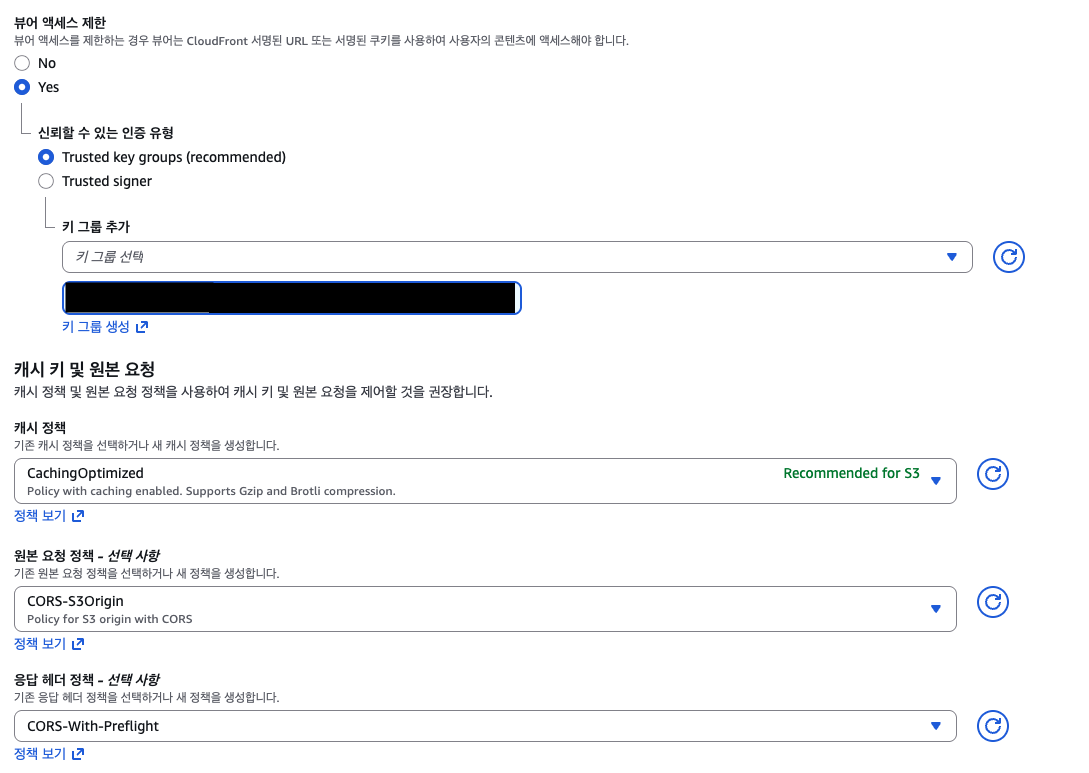
- Origin Request Policy: Select
CORS-S3Origin(Forwards Origin) - Response Headers Policy: Select
CORS-With-Preflight(Allows Access-Control-Allowed-Origin in header)
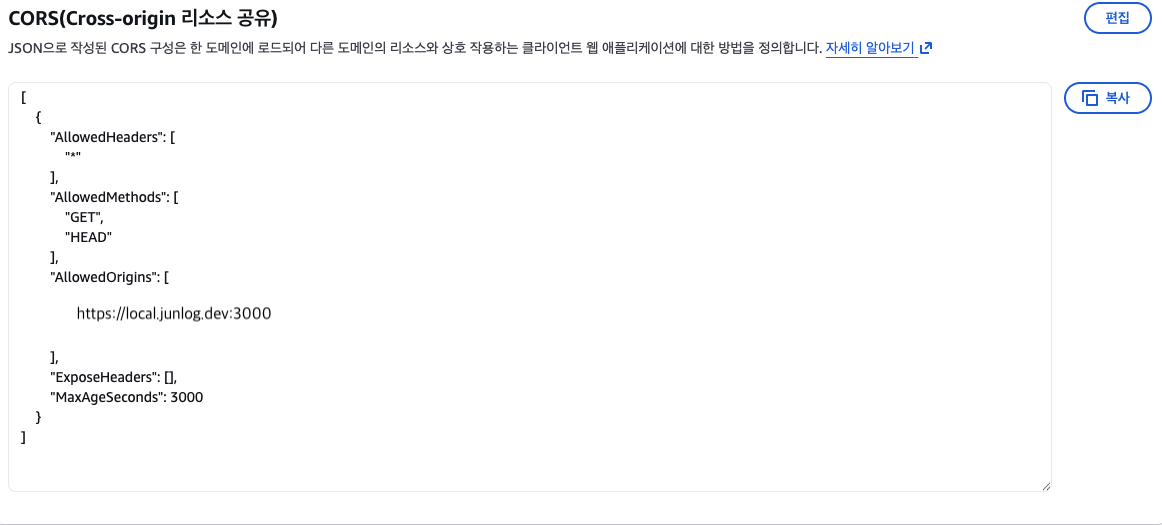
[
    {
        "AllowedHeaders": [
            "*"
        ],
        "AllowedMethods": [
            "GET",
            "HEAD"
        ],
        "AllowedOrigins": [
            "https://local.junlog.dev:3000"
        ],
        "ExposeHeaders": [],
        "MaxAgeSeconds": 3000
    }
]- S3 Bucket ⇒ Permissions ⇒ CORS: Set
AllowedOriginsas shown in the code above.
These three settings are the core configuration.
Note: You must perform an invalidation in CloudFront after applying all settings.


After clearing the cache, you will see that the requests succeed.
Deep Dive into Troubleshooting
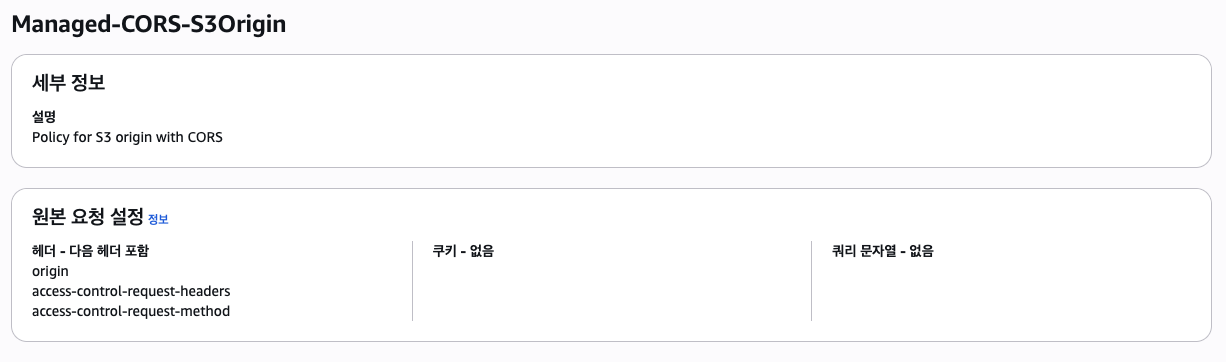
First, let's look at the Request Policy.
The image below shows the role of forwarding the headers of the original request to the next stage. You can verify here that it forwards the origin.
This policy defines which headers to include in the response.
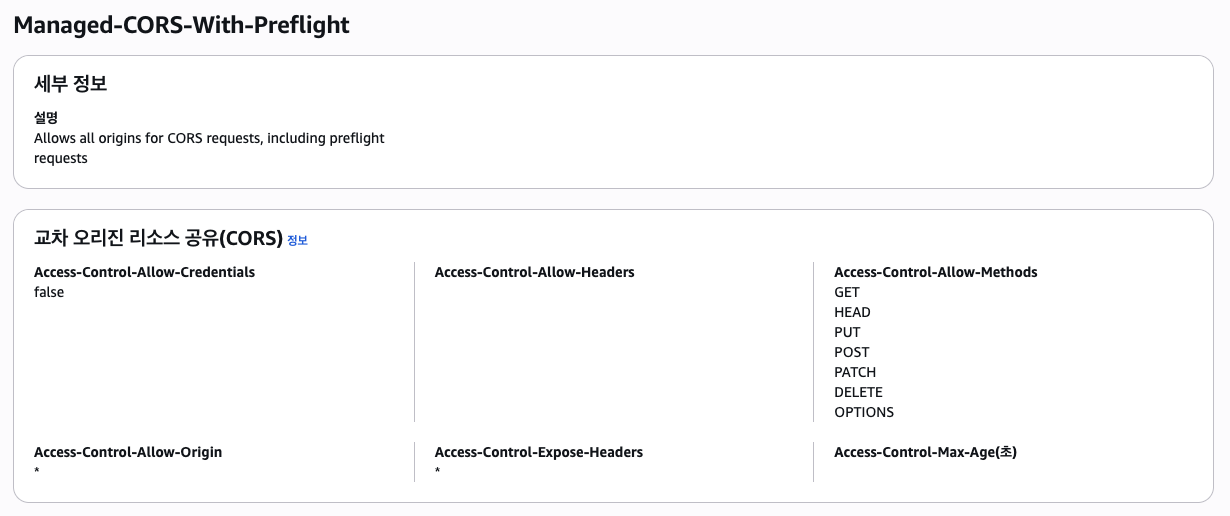
A common point of confusion here is thinking that since the flow is S3 ⇒ CloudFront ⇒ Response, the settings will naturally be overwritten. However, the official documentation states that if the header is already present, it is used.
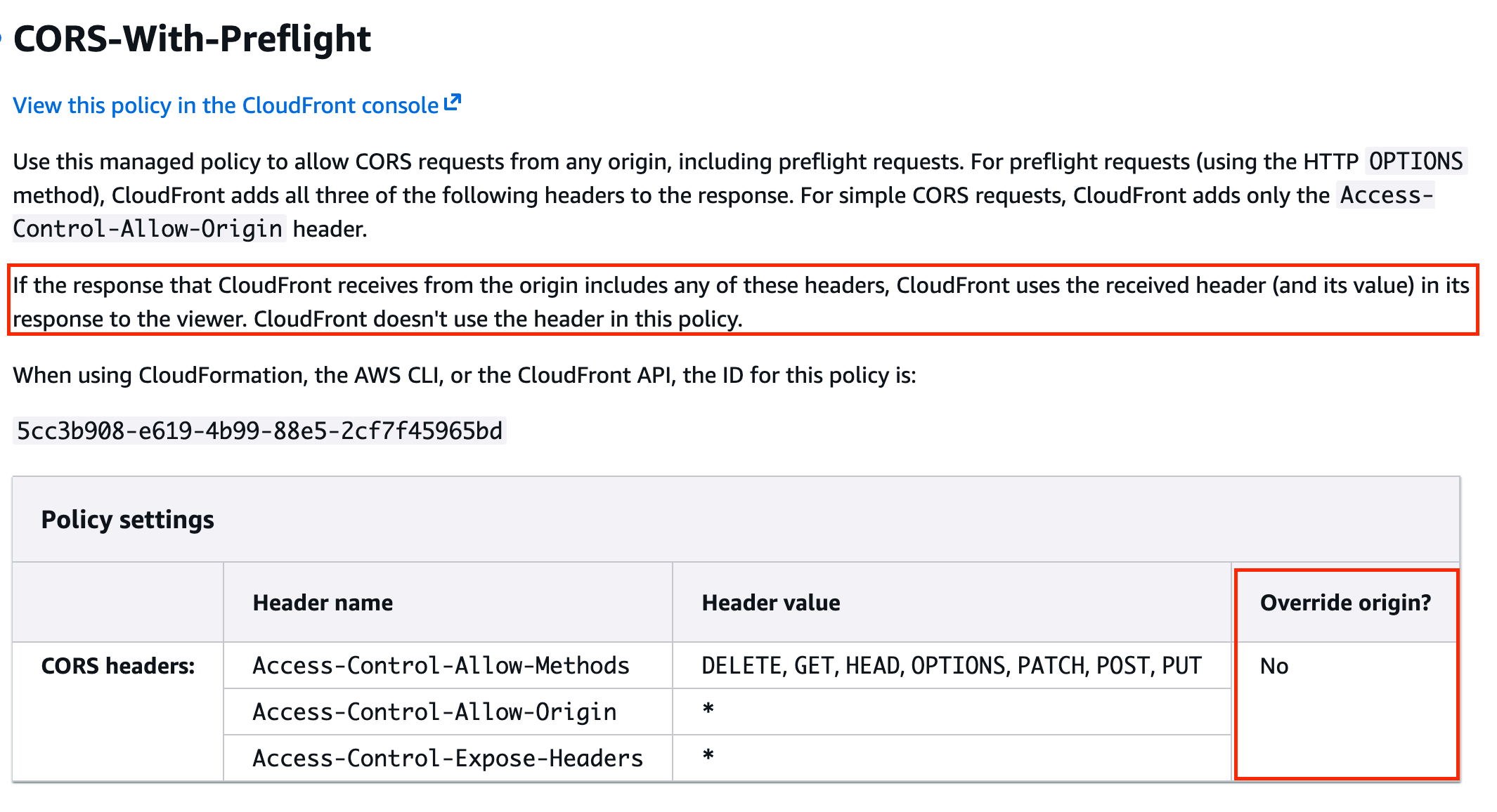
As shown in the image above, it states that if the header is included in the origin response, the policy does not overwrite it.
In other words, by using the CORS settings provided by the S3 Bucket, the correct headers successfully reach the response.
Share this post
Comments (0)
No comments yet. Be the first to comment!